FAQ's
Eyebrow
Frequently asked questions
A content management system (CMS) is an application that is used to manage content, allowing multiple contributors to create, edit and publish. Content in a CMS is typically stored in a database and displayed in a presentation layer based on a set of templates like a website.
The following are common functions of a CMS:
-
Content creation allows users to easily create and format content
-
Content storage stores content in one place, in a consistent fashion
-
Workflows assigns permissions for managing content based on roles such as authors, editors and admins
-
Publishing tells the software when and where the content should go live
-
Optimization helps you improve digital experience and learn from your content
Benefits of a content management system
One major advantage of a CMS is its collaborative nature. Multiple editors can contribute, schedule or manage content to be published. Because the user interface is usually browser-based, a CMS can be accessed from anywhere by any number of users.
The second major advantage of a CMS is that it allows non-technical people who don’t know programming languages to easily create and manage their own content. The drag-and-drop editors of a typical content management platform allows users to enter text and upload images without needing to know any HTML or CSS (programming languages).
When a company uses a CMS to publish its web pages, it reduces its reliance on front-end developers to make changes to the website, making it quicker and easier to publish new web pages improving the digital experience for users and visitors.
When a company uses a CMS to publish content to other channels - like social, mobile apps and ecommerce, it can drastically reduce the amount of development a company needs to do and make it easier to distribute content to different channels simultaniously.
You create a page from page types that contain the properties where information is added.
- In the page tree structure, select the page under which you want to add the new page.
- Select New Page from the context menu or the add button on the toolbar.
- Select a page type from the list of available page types, and provide a name for the page.
- Add information in the various properties available for editing, such as the rich-text editor if this is part of the selected page type.
- Preview the page before sending it for approval or publishing it.
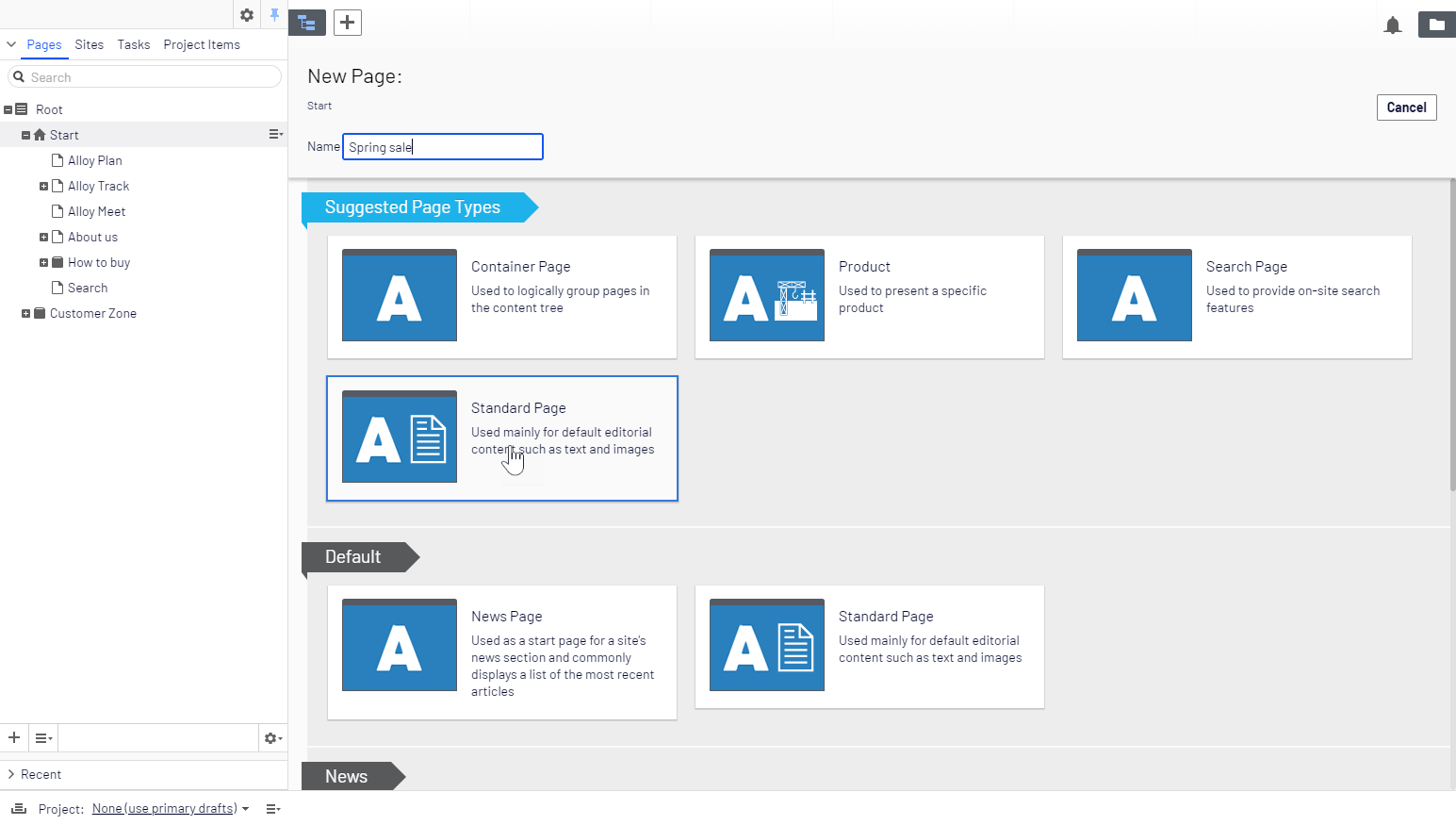
You create a block in a similar fashion as a page, by selecting a predefined block type that contain properties where information is added. For more information on working with blocks, see the Blocks topic.
- Create a block from the assets pane, directly from content areas in pages or from the add button in the toolbar.
If you add a block directly from the content area, it is saved in the For This Page folder, which means that it is available only on the selected page and cannot be used on other pages.
- Select a block type from the list of available blocks.
- Provide a name for the block.
- Add information for the block.
Optimizely Content Management System (CMS) provides powerful web content management capabilities, available through an intuitive user interface, letting experienced and occasional users work efficiently with content.
Every page in Optimizely consists of page template (the outer container of the page) and blocks, that can be added to the page. To begin your page assembly, you need to add a new page and choose a page template. After your page is created, you will need to add blocks to that page.
Think about blocks as lego boxes and a page template as an outer container for the blocks (see illustration below).

Here are some helpful links you can learn from on Optimizely website: