Accordion Block
Overview
An accordion block helps organize and present information in a structured and space-efficient manner. It is particularly useful when you have a lot of content or categories to display, but you want to avoid overwhelming the user with too much information at once.
Contents:
- Block customization options
- Block examples:
- Accordion block without background color
- Accordion block with light blue background color
- Accordion block without background color and footer link
- Accordion block with light blue background color and footer link
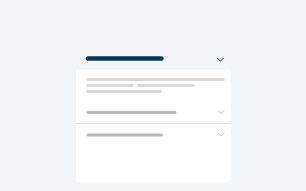
Block Customization Options
| Element | Required | Options Available |
|---|---|---|
| Background color | N |
|
| Eyebrow | N |
|
| Header | N |
|
| Accordion Items | N |
|
| Footer Links | N | Input |
Accordion Block without Background Color
Eyebrow - Lorem ipsum dolor sit amet
Heading Text - Duis aute irure dolor in reprehenderit
Lorem ipsum dolor sit amet, consectetur adipiscing elit, sed do eiusmod tempor incididunt ut labore et dolore magna aliqua. Ut enim ad minim veniam, quis nostrud exercitation ullamco laboris nisi ut aliquip ex ea commodo consequat.
Lorem ipsum dolor sit amet, consectetur adipiscing elit, sed do eiusmod tempor incididunt ut labore et dolore magna aliqua. Ut enim ad minim veniam, quis nostrud exercitation ullamco laboris nisi ut aliquip ex ea commodo consequat.
Nulla aliquet enim tortor at auctor urna. Mi ipsum faucibus vitae aliquet. At in tellus integer feugiat scelerisque varius morbi enim nunc. Posuere lorem ipsum dolor sit amet. Sit amet venenatis urna cursus eget.
Block above has these settings:
| Element | Option Selected |
|---|---|
| Background color | None |
| Eyebrow | Yes |
| Header | Yes |
| Accordion Items | Yes |
| Footer Links | No |
Accordion block with light blue background color
Eyebrow - Lorem ipsum dolor sit amet
Heading Text - Duis aute irure dolor in reprehenderit
Lorem ipsum dolor sit amet, consectetur adipiscing elit, sed do eiusmod tempor incididunt ut labore et dolore magna aliqua. Ut enim ad minim veniam, quis nostrud exercitation ullamco laboris nisi ut aliquip ex ea commodo consequat.
Lorem ipsum dolor sit amet, consectetur adipiscing elit, sed do eiusmod tempor incididunt ut labore et dolore magna aliqua. Ut enim ad minim veniam, quis nostrud exercitation ullamco laboris nisi ut aliquip ex ea commodo consequat.
Nulla aliquet enim tortor at auctor urna. Mi ipsum faucibus vitae aliquet. At in tellus integer feugiat scelerisque varius morbi enim nunc. Posuere lorem ipsum dolor sit amet. Sit amet venenatis urna cursus eget.
Block above has these settings:
| Element | Option Selected |
|---|---|
| Background color | Yes |
| Eyebrow | Yes |
| Header | Yes |
| Accordion Items | Yes |
| Footer Links | No |
Accordion block without background color and footer link
Heading Text - Duis aute irure dolor in reprehenderit
Lorem ipsum dolor sit amet, consectetur adipiscing elit, sed do eiusmod tempor incididunt ut labore et dolore magna aliqua. Ut enim ad minim veniam, quis nostrud exercitation ullamco laboris nisi ut aliquip ex ea commodo consequat.
Lorem ipsum dolor sit amet, consectetur adipiscing elit, sed do eiusmod tempor incididunt ut labore et dolore magna aliqua. Ut enim ad minim veniam, quis nostrud exercitation ullamco laboris nisi ut aliquip ex ea commodo consequat.
Nulla aliquet enim tortor at auctor urna. Mi ipsum faucibus vitae aliquet. At in tellus integer feugiat scelerisque varius morbi enim nunc. Posuere lorem ipsum dolor sit amet. Sit amet venenatis urna cursus eget.
Block above has these settings:
| Element | Option Selected |
|---|---|
| Background color | No |
| Eyebrow | No |
| Header | Yes |
| Accordion Items | Yes |
| Footer Links | Yes |
Accordion block with background color and footer link
Heading Text - Duis aute irure dolor in reprehenderit
Lorem ipsum dolor sit amet, consectetur adipiscing elit, sed do eiusmod tempor incididunt ut labore et dolore magna aliqua. Ut enim ad minim veniam, quis nostrud exercitation ullamco laboris nisi ut aliquip ex ea commodo consequat.
Lorem ipsum dolor sit amet, consectetur adipiscing elit, sed do eiusmod tempor incididunt ut labore et dolore magna aliqua. Ut enim ad minim veniam, quis nostrud exercitation ullamco laboris nisi ut aliquip ex ea commodo consequat.
Nulla aliquet enim tortor at auctor urna. Mi ipsum faucibus vitae aliquet. At in tellus integer feugiat scelerisque varius morbi enim nunc. Posuere lorem ipsum dolor sit amet. Sit amet venenatis urna cursus eget.
Block above has these settings:
| Element | Option Selected |
|---|---|
| Background color | Yes |
| Eyebrow | No |
| Header | Yes |
| Accordion Items | Yes |
| Footer Links | Yes |