How to Assemble a Page
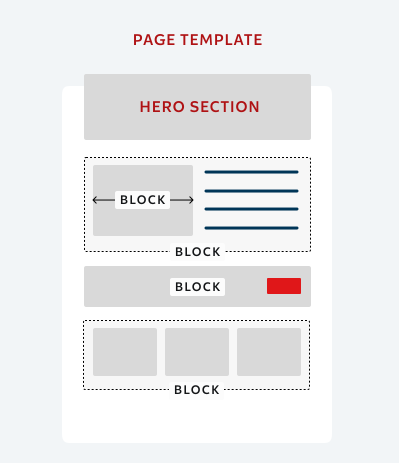
Illustration 1.1
Optimizely Content Management System (CMS) provides powerful web content management capabilities, available through an intuitive user interface, letting experienced and occasional users work efficiently with content.
Every page in Optimizely consists of page template (the outer container of the page) and blocks, that can be added to the page. To begin your page assembly, you need to add a new page and choose a page template. After your page is created, you will need to add blocks to that page.
Think about blocks as lego boxes and a page template as an outer container for the blocks (see illustration 1.1).
Here are some helpful links you can learn from on Optimizely website:
Templates and Bocks
Explore page templates and blocks that are available in the DXP CMS.
Page Templates
A template constructs an overall layout that you can reuse to create campaign or task briefs. You can add blocks to the pages to assemble them.

Blocks
Blocks in Optimizely Content Management System (CMS) are reusable smaller content parts that editors can add to other content types.

Optimizely Content Management System (CMS)
This section explains how the Optimizely Content Management System works, highlights the differences between page templates and blocks, provides practical examples of each for content authors, and showcases block variations with different settings selected.